
Coral App Review & User Guide


App Store
70k reviews
Version 26.10.16
109.4 MB
Play Store
12.8k reviews
Version 26.09.14
1,000,000+ downloads
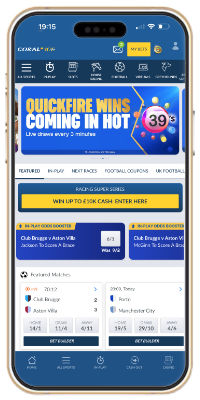
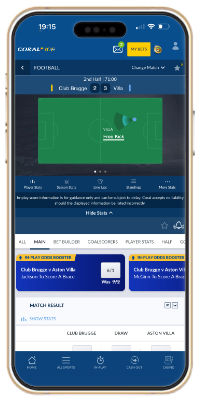
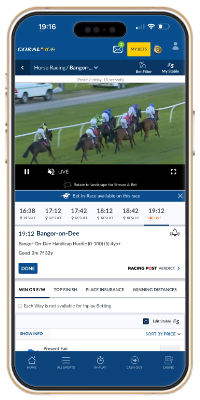
Coral app review
The Coral app mixes sports betting with slots, roulette and casino card games in one single-wallet product — Entain’s blue bookie on mobile, known for short-lived price boosts and free UK/Irish racing streams.
The Coral app is a solid platform for both betting and casino. You can move between sports and games without bouncing between apps. It’s simple enough for most punters and still carries the short-term enhanced prices Coral is known for — some boosts last as little as 15 minutes.
On launch you get a branded home page with quick links to Football and Racing, plus A–Z sports and gaming. Obscure sports (chess, speedway, pool) sit alongside the majors, and many events carry live streams where rights allow.
Quick takeaways
- Single wallet for sports and casino — no balance juggling
- Cash Out hub within two taps of the home screen
- Build Your Bet with cash-out on match-market builders
- Free UK and Irish racing streams for logged-in users (no stake gate)
- Bet & Watch full-screen stream with betting options alongside
Best for
- Football coupons and Build Your Bet fans
- Racing punters who want free streams
- Players who want sports and casino in one app
Company (short)
- Address: Suite 6, Atlantic Suites, Gibraltar, GX11 1AA
- Support: Help & Contact in-app
- Social: @Coral · Facebook /Coral
Current new customer offer
The live welcome offer and claim button sit in the header above — always read those terms before you join. Headline wording can change; use the header as the source of truth.
Appearance
Graphics are clear and the layout is easy to scan. Text-heavy areas use a light grey-to-white background so copy stands out; in-game screens often use Coral’s blue branded background. Quick links and an A–Z keep popular and niche sports a couple of taps away.
Other Coral apps
Casino is built into the sports app via its own hub, but Entain also publishes sister products. Download a dedicated app only if that’s what you want — this page focuses on the sports app.
Casino
Blackjack, poker, baccarat, roulette in multiple formats, plus a large slots catalogue and live casino. Single wallet with the sportsbook. Coral Rewards grabber is free to play after at least £10 of casino play (terms apply).
Live Casino
Immersive live-dealer tables with a large dealer roster for roulette, blackjack and related games — also reachable from the sports app casino hub.
Poker
Sit & go, tournaments and cash games (blinds from very low stakes). Free-rolls and live tournament qualifiers for events such as WSOP and WPT appear regularly. Tables are functional rather than flashy.
Bingo
No dedicated bingo app — bingo lives inside the Casino product. Formats include 36, 50, 75, 80 and 90-ball across 15+ rooms, with ticket packages and variants such as cash-out bingo.
App features
Jump to a topic:
Cash Out
Cash Out lets you settle a bet before the event finishes. Coral puts a dedicated Cash Out section in the main menu — open bets with a cash-out amount are visible within two taps of the home screen.
Markets that support cash-out show the cash-out icon beside the price. Expect a short delay (around 6–9 seconds) while the request processes; it is only confirmed once the bet shows as settled. If the market suspends mid-request, the cash-out cancels and you need to resubmit at the updated amount.
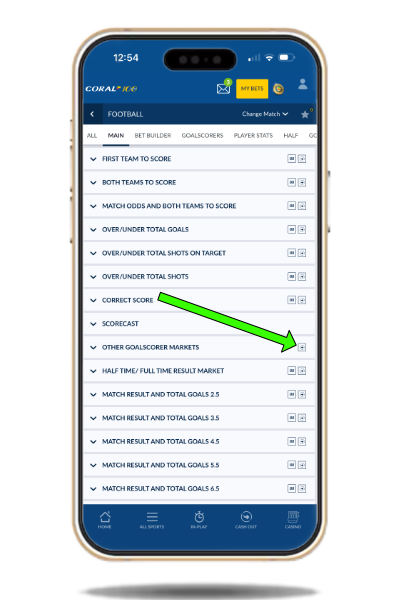
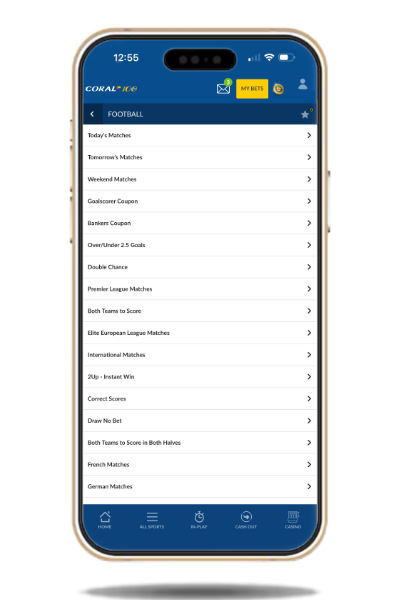
Coral’s football coupons
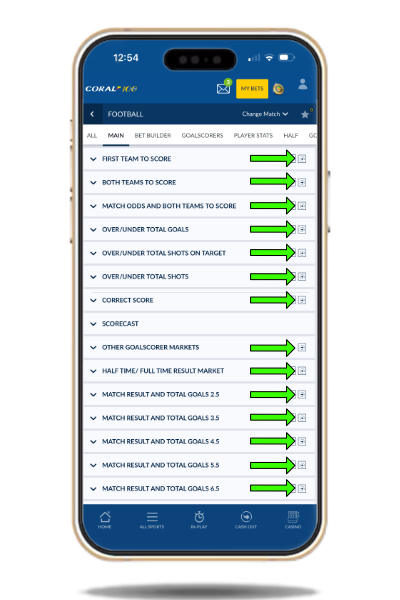
Football coverage runs across most leagues you’d expect. You can build bets and get instant pricing across 20+ coupons — daily lists for Premier League, Serie A, La Liga and more. Core markets include Match Result and Both Teams To Score, plus deeper lines such as BTTS in both halves, handicaps, cards and corners.
Open Football → Accumulators tab for the coupon list. Popular examples include:
- Weekend football — main European matches across Saturday and Sunday
- Win & BTTS — home/away/draw combined with both teams to score
- Correct score — multi-match correct-score coupon
Build Your Bet
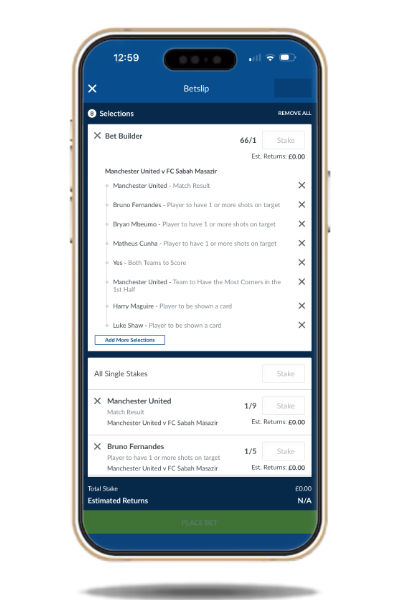
Build Your Bet combines multiple markets from the same football match into one priced bet. Availability spans 100+ leagues and tournaments. A standout vs many rivals: cash-out is offered on Build Your Bet tickets placed via the Match Markets tab.
Use it when you want combinations that aren’t already priced as a special. The market list is deep — scroll to find player, team and match lines.

Live streaming
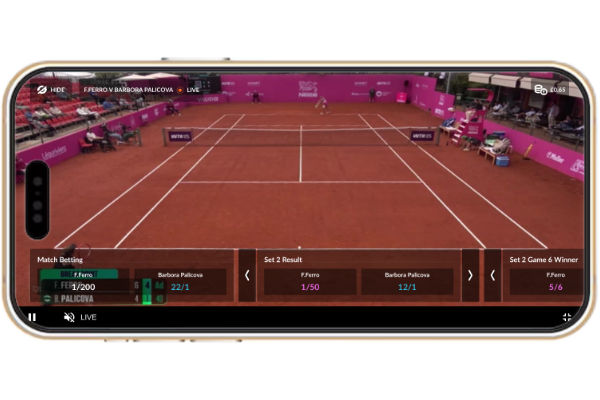
Coral streams all UK and Irish greyhound and horse racing to mobile and tablet. Logged-in users can watch free — no stake-on-the-race gate like some rivals. That alone makes the app useful for racing fans who want to study a run whether or not they’ve backed the horse.
Bet & Watch
Coral’s stream viewer supports full-screen watching with betting options still available alongside — one of the clearer hybrid viewers in the UK market. Streams use mobile data when you’re out and about; in-play events also get lighter-data score/visual overlays. On a tablet (Galaxy Tab or iPad in our tests) the experience is more comfortable than on a phone.
Coral bet app offers
Promotions rotate through the season — past examples include free bets on greyhound winners, Acca insurance, and BTTS & Win Acca insurance on four-folds or more. Check the in-app Promotions tab for what’s live. The welcome offer for new customers is always shown in the header on this page — don’t rely on old headline wording in reviews.
Not just a sports betting app
The casino menu transforms the home hub into slots, blackjack, roulette and more. The single wallet means sports funds and casino funds share one balance — no manual transfers between products.
Rewards Grabber
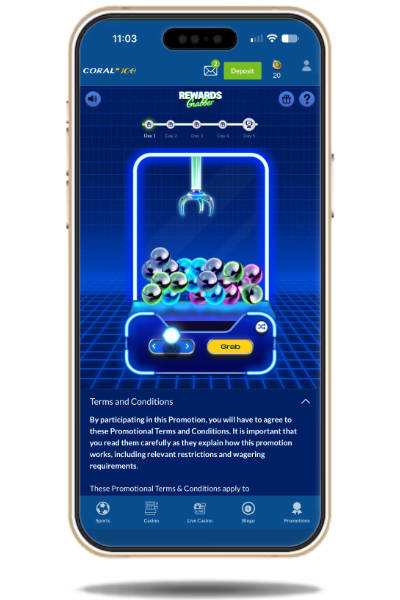
Coral has a free-to-play game in its casino section called Rewards Grabber, giving customers the chance to pick up cash, free spins or Coral Coins without having to place a bet.

Opening the game reveals a neon claw machine filled with different coloured balls. Move the claw into position, pick a ball you like the look of and hit GRAB to see what you’ve won. You get one grab per day and the prizes include:
- Cash — from 30p up to £100
- Free spins — 3–5 spins worth 10p each on selected games
- Coral Coins — between 5 and 2,000 virtual coins that can be exchanged for rewards
Coral Coins can be redeemed through Coral’s rewards system for offers including free bets, free spins and other gaming rewards. Coins do expire, so you’ll need to use them within the timeframe shown in your account.
If Coral Coins drop from the claw, there’s another decision to make. You can bank them immediately or use the gamble feature for the chance to increase your prize. On the standard Rewards Grabber, the potential multiplier goes as high as 6x. With a maximum initial prize of 2,000 Coral Coins, that means as many as 12,000 Coins could potentially be won — although gambling the prize also means you risk walking away with nothing.
Golden Rewards Grabber
There’s an extra reward for coming back regularly. Play Rewards Grabber on five days during the same Monday-to-Sunday period and you unlock the Golden Rewards Grabber, where the potential prizes get bigger.
The maximum standard cash prize increases from £100 to £500, while a Coral Coins prize can be gambled with a potential multiplier of up to 10x. Land the maximum 2,000 Coins and successfully hit the top multiplier and that would mean 20,000 Coral Coins.
Significant terms
18+. Promotion runs 20/04/26–03/01/27. One grab per day. Prizes include 3–5 free spins on selected games (£0.10 per spin, valid for 7 days), 5–2,000 Coral Coins (expiry applies and includes a gamble feature), and cash from £0.30 up to £100. Golden Rewards Grabber offers cash prizes up to £500, while Golden Centenary prizes can reach £1,000. Play on five days between Monday and Sunday to unlock the Golden Grabber. Restrictions and T&Cs apply.
Rewards Shaker
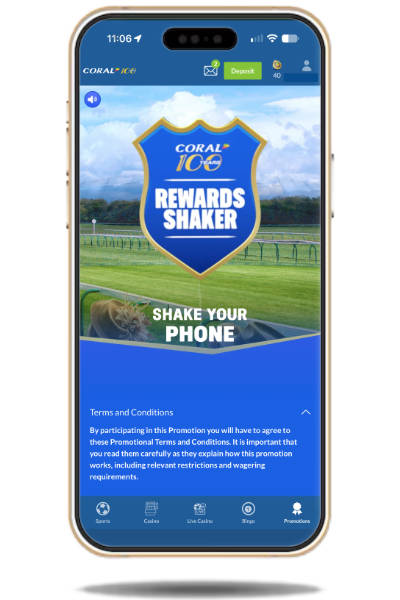
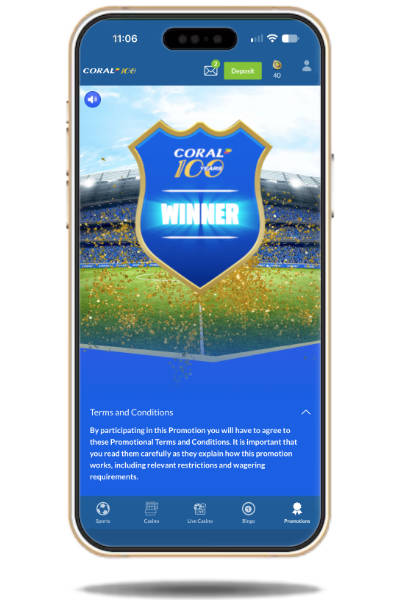
Rewards Shaker is another Coral promotion offering eligible customers guaranteed daily rewards and special offers. Enter the promotion and give your mobile device a shake to start the shaker, sending the on-screen shield spinning to reveal a prize or offer.

Possible rewards include:
- Cash prizes
- Free bets
- Boost tokens
- Coral Coins
- Trading specials
- Bet & Get offers
- Enhanced markets
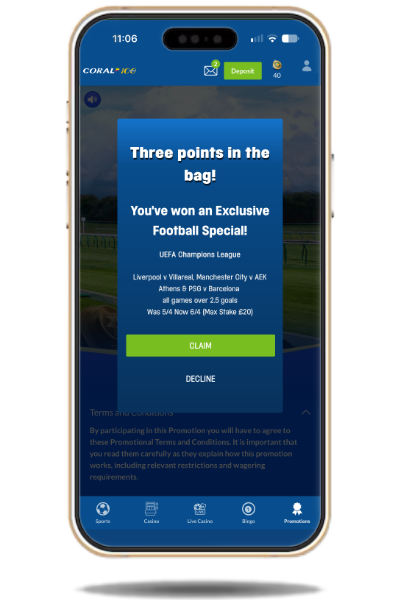
Having played this promotion regularly, I’ve personally found that I tend to land an offer rather than a cash prize. These can still be useful, depending on the markets available and the terms attached. For example, the screenshot below shows an enhanced market as the reward.
Significant terms and conditions
18+. Promotion available from 27/07/26. Rewards Shaker can be used a maximum of once daily between 08:00 and 20:00. £/€100k total prizes available on selected days. Rewards include cash, free bets (in-shop or online), Boost tokens, Coral Coins, trading specials, Bet & Get offers and enhanced markets. Restrictions and T&Cs apply.
Coral Football Super Series
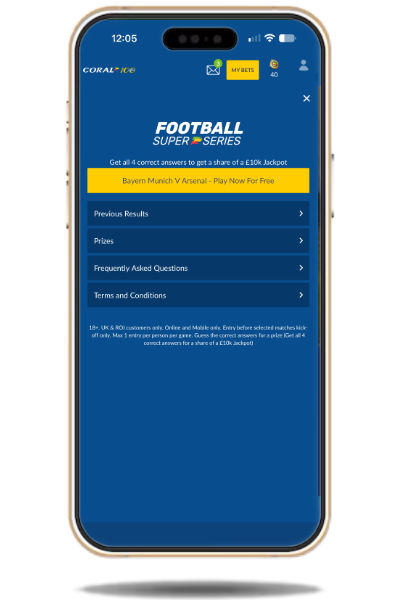
Coral Football Super Series gives football fans the chance to take a free shot at a share of a £10,000 jackpot by answering four multiple-choice questions about an upcoming football fixture selected by Coral.

The questions focus on match events, such as how many cards will be issued or how many corners there will be during the game. Each question comes with several possible answers covering a range of outcomes.
Answer all four questions correctly and you’ll qualify for a share of the £10,000 jackpot, split between everyone who predicts all four answers correctly. There are also rewards for getting two or three questions right, so you don’t necessarily need a perfect score to win something.
The prize structure is as follows:
- One correct answer: Better luck next time.
- Two correct answers: £1 Bet Builder free bet.
- Three correct answers: £2 Bet Builder free bet.
- Four correct answers: A share of the £10,000 jackpot, divided between all players who answer every question correctly.
There’s an extra incentive to enter, too. All participants receive 20 Coral Coins just for taking part. These can be spent in the Coral Store in exchange for rewards such as free spins, casino bonuses, free bets and cash.
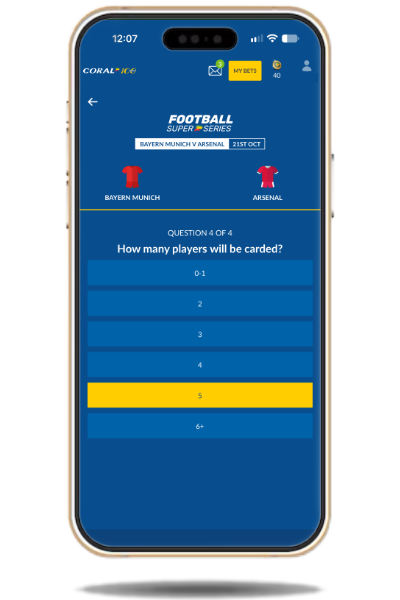
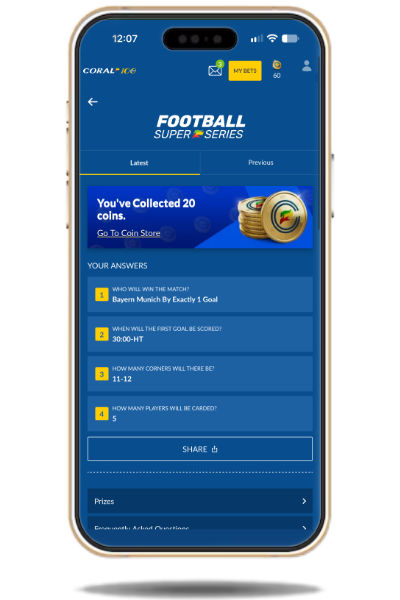
It’s a straightforward way for football fans to test their knowledge of an upcoming match without needing to place a bet to enter. Just make sure you submit your answers before kick-off, as entries are only accepted ahead of the selected fixture.
Significant terms and conditions
18+. UK and ROI customers only. Online and mobile only. Entries must be submitted before kick-off of selected matches. Maximum one entry per person per game. Prizes are awarded for correct answers, with all four correct answers qualifying for a share of the £10,000 jackpot. Restrictions and full T&Cs apply.
Coral Racing Super Series
Horse racing fans aren’t forgotten about at Coral. The Racing Super Series is a free-to-enter knockout competition that gives players the chance to win a share of a guaranteed £10,000 prize pool.

When a round is open, entrants must pick a horse in each of seven different races that they think will finish in a placing position. If one selection fails to place, you’re eliminated from that round. If all seven horses place, you’ll share the prize pool with everyone else who correctly predicted all seven selections.
The logical strategy is to pick the favourites in each race. However, many other entrants are likely to take the same approach. If all seven of your selections place, you could therefore end up sharing the jackpot with a large number of other players.
The rounds with fewer successful entrants and some longer-priced horses placing are the ones where larger individual payouts are possible. This adds a strategic element to the competition, although less-fancied horses naturally come with a greater risk of failing to place.
I’m yet to correctly predict all seven horses in a single round. The closest I’ve come is six, as shown in the screenshot below.
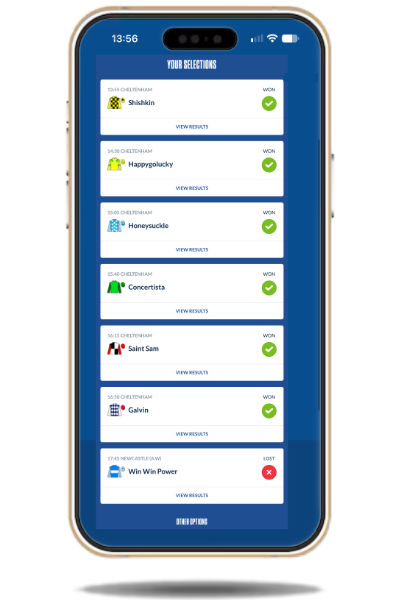
Whatever strategy you choose, the Racing Super Series keeps horse racing interesting without requiring a paid entry. In my opinion, it’s well worth entering. You’ll also receive 20 Coral Coins every time you enter, providing an additional reward for taking part.
Significant terms and conditions
18+. UK and ROI customers only. Available online and in Coral shops with Coral Rewards. Maximum one online entry per customer per game. Correctly select a horse to place in each of the selected races to win a share of the cash prize pool. 20 Coral Coins credited on entry. Restrictions and full T&Cs apply.
Coral app user guide
Walkthroughs for everyday tasks on the Coral app — registering, depositing, placing bets, checking open/settled bets, verifying, withdrawing, cash-out availability, safer gambling tools, closing an account and contacting support.
How to register
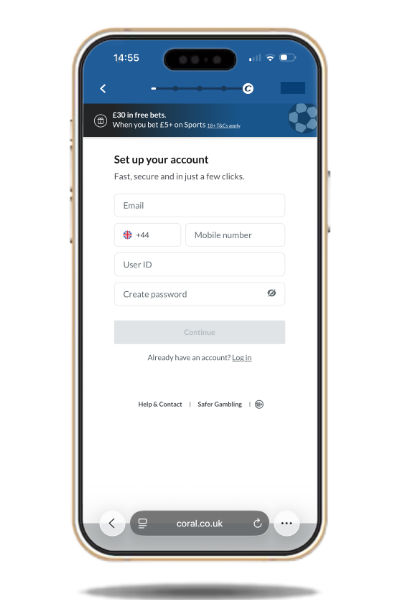
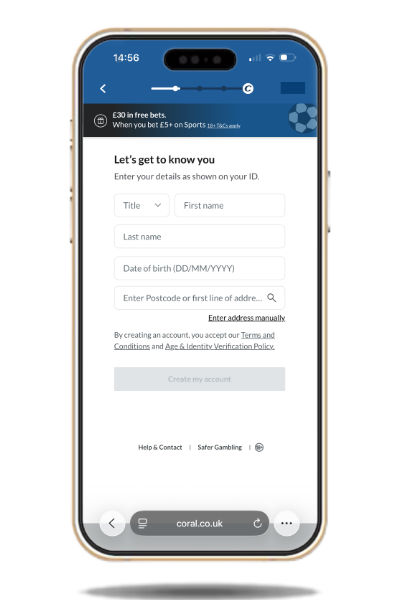
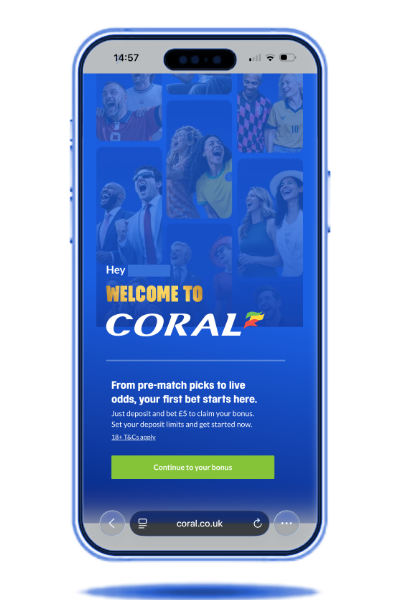
You must be 18+ and in a country where Coral is licensed. Use the Get App / Claim Offer button in the header when you’re ready — that route typically pre-fills the current new-customer offer. Registration is three short steps.
- Account details: email, phone number, user ID and password — then Continue.
- Identity: title, full name, date of birth and address. Use the name on your passport or driving licence — those documents may be needed later for verification.
- Contact & agreement: set deposit limits, agree to fund protection policy, choose contact preferences and view full bonus details.
You can then add a payment method, deposit and bet. Coral may ask you to verify — see Verify below.
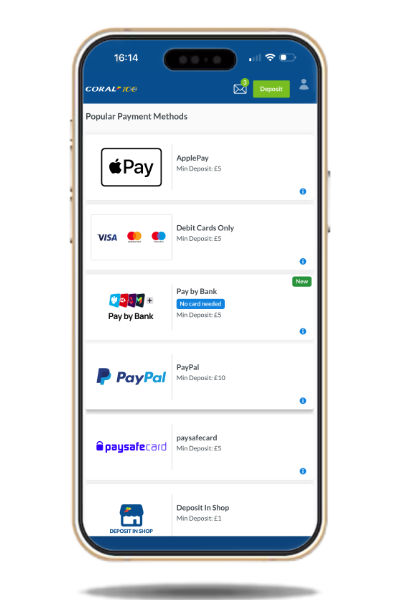
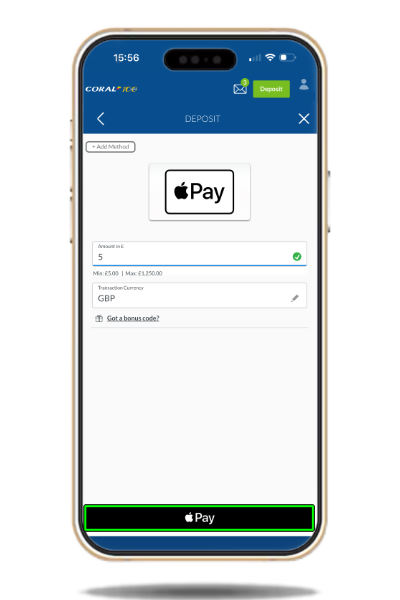
How to deposit
Fund the wallet before you bet. Returns also land in the same account balance.
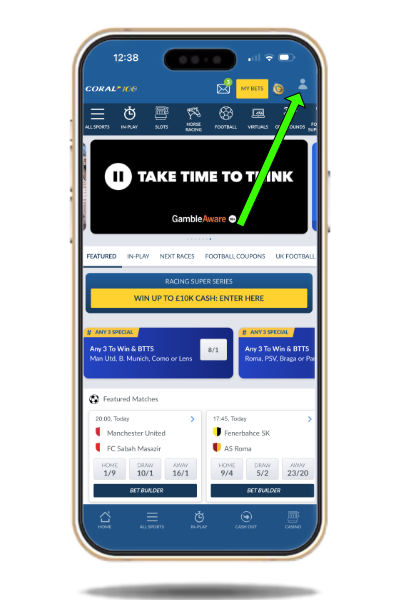
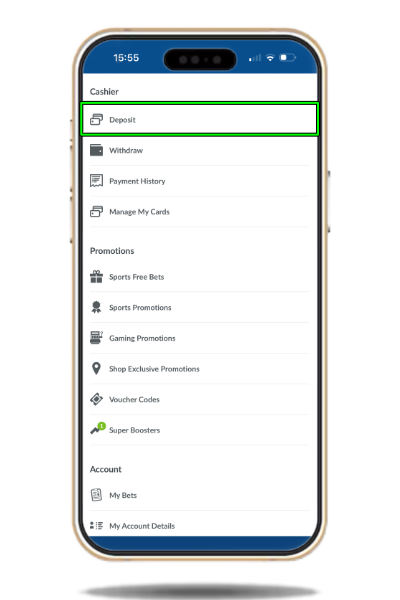
- Tap the account icon (top right) to open settings.
- Select Deposit.
- Choose a payment method from the list.
- Enter any required details and the amount, then Pay / Deposit.
How to place a bet
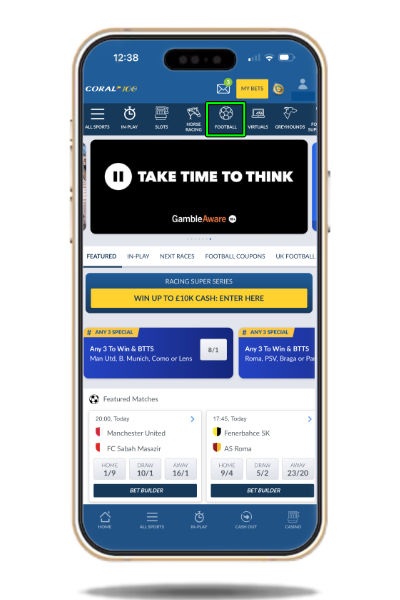
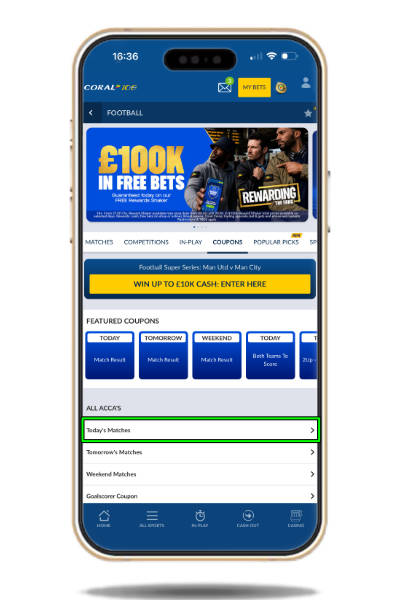
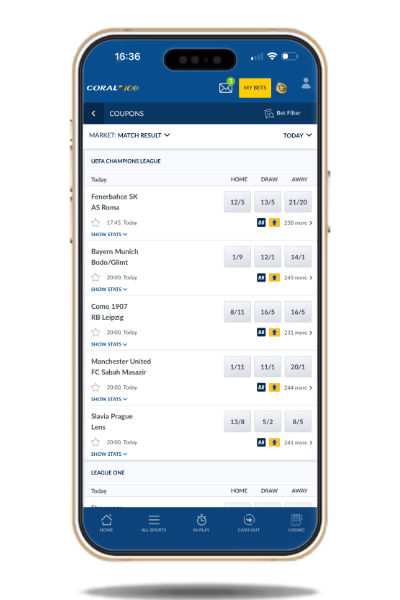
Example: an accumulator on today’s football (including Champions League fixtures).
- From home, tap the football icon.
- Open Today’s Matches (or Competitions → your league).
- Elite leagues appear near the top; change coupon/market filters above the list if needed.
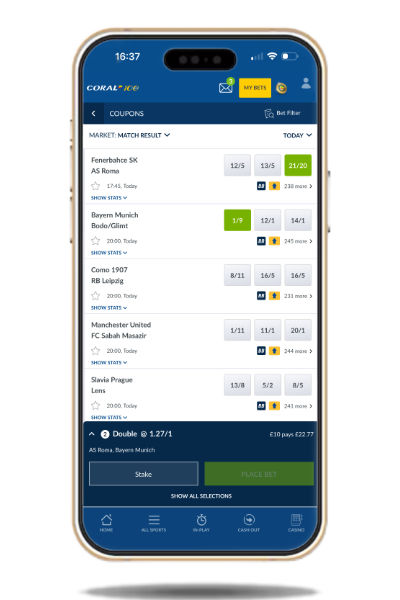
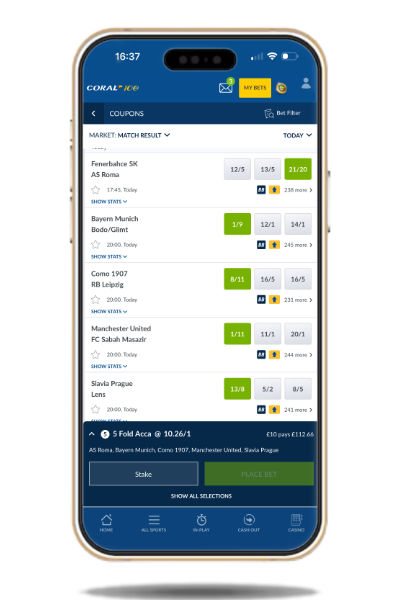
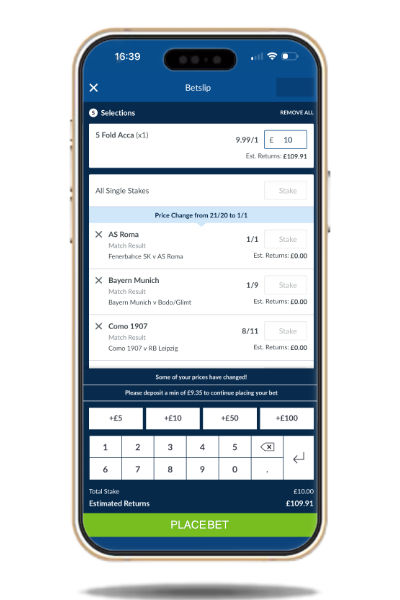
- Tap odds boxes to add selections — they turn green and the bet-slip count updates at the bottom of the screen.
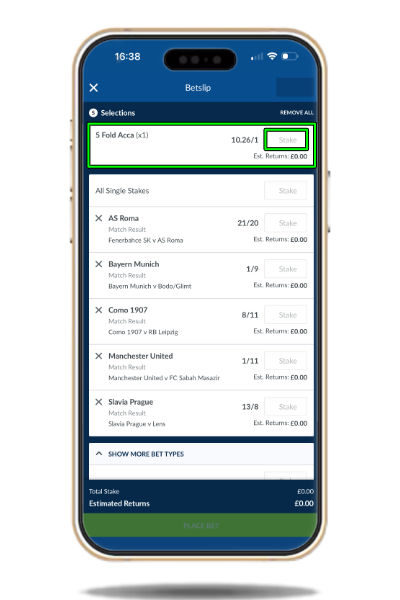
- Open the bet slip by tapping on it.
- Enter a stake on the multi/acca field, review estimated returns, then place the bet and check the confirmation receipt.
How to check open and settled bets
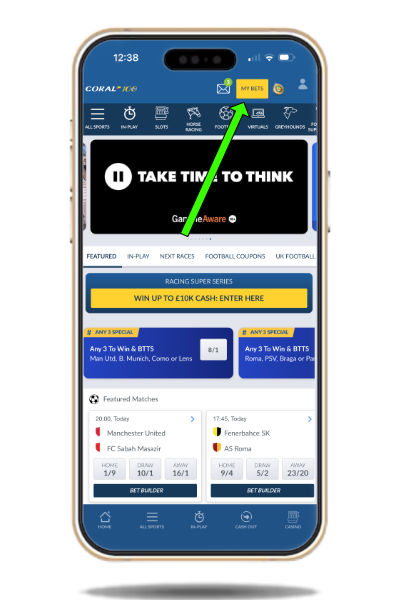
Tap MY BETS at the top of the app. Open bets, settled bets and shop bets are listed here, plus a dedicated cash-out area for open bets that currently offer an early settlement amount.
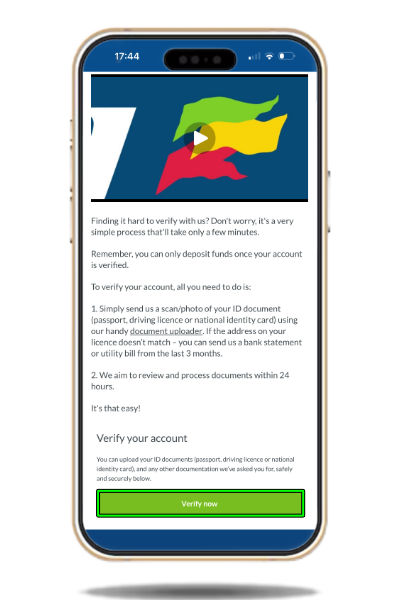
How to verify your account
Under its licence Coral must protect customers from identity fraud, confirm users are 18+ in a licensed territory, and support responsible gambling. You may be emailed or notified when documents are needed.
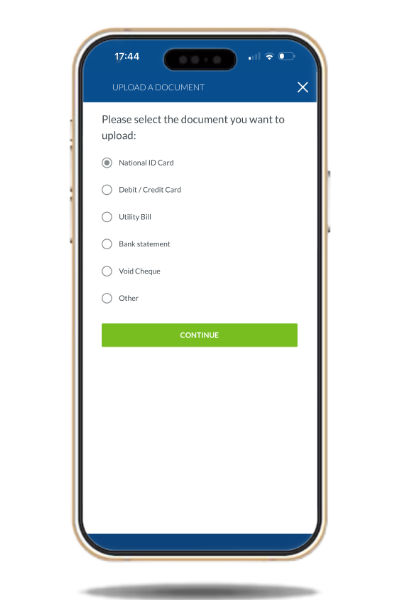
Typical requests include ID (passport or driving licence), address proof (utility bill within three months), and sometimes financial documents (wage slips or bank statements) when spend or limits change sharply.
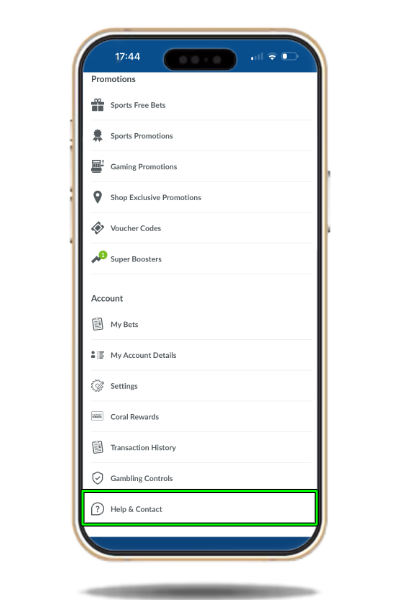
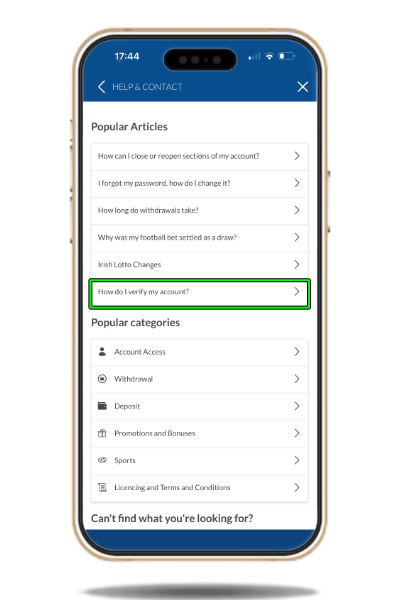
- Open account settings → Help & Contact.
- Open the “How do I verify?” article and tap Verify Now.
- Choose document type, pick the file from photos/files, upload, then wait for Coral to approve.
How to withdraw
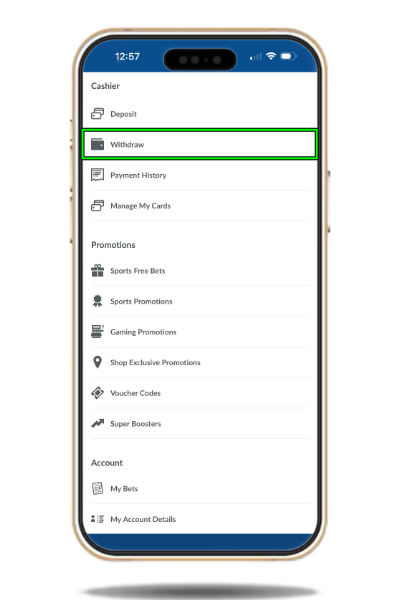
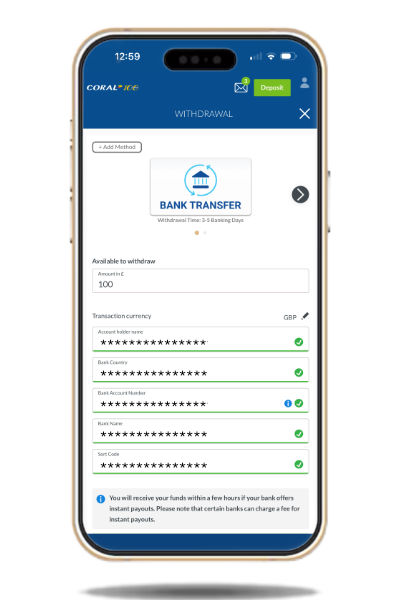
Withdrawal mirrors deposit.
- Open account settings → Withdraw.
- Pick an approved method from the icons at the top.
- Enter amount and required fields, then tap Withdraw.
Timing depends on method (examples from Coral’s published ranges): debit card 1–3 working days; Visa Fast Funds ~4 hours; PayPal / Paysafecard ~8 hours; bank transfer 2–4 working days; Coral Connect Card often instant.
How to see if cash out is available
Not every market supports cash-out. Eligible market boxes show the cash-out icon. Use the Cash Out / My Bets cash-out hub to see live offers on open bets.
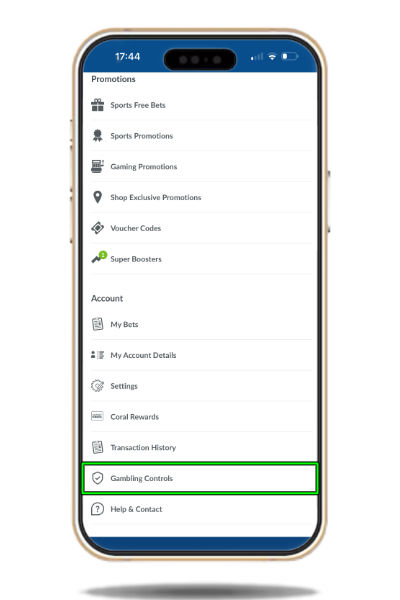
Responsible gambling tools (in-app)
Safer gambling tools live under account settings. Scroll to the gambling controls hub (just above Help & Support). Tools are grouped by category once the hub opens — use them to keep play within limits that suit you. Full policy: Coral safer gambling.
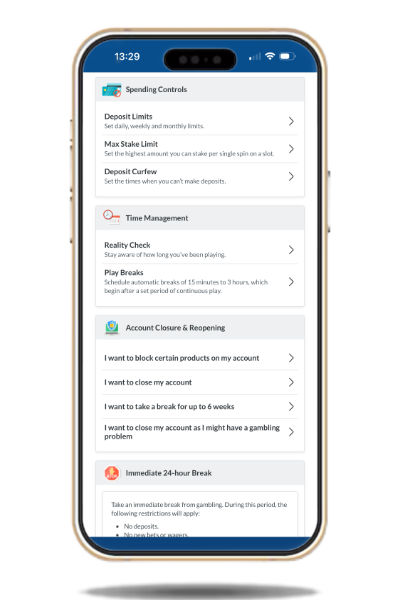
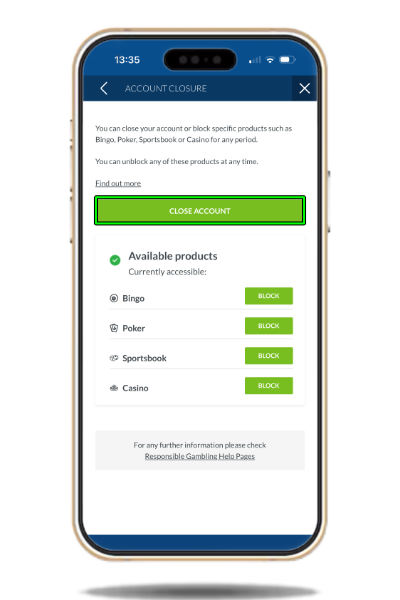
How to close a Coral account
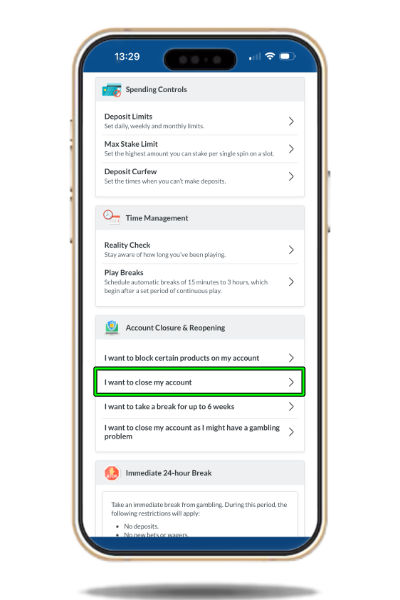
- Open gambling controls → Account closure and reopening. Choose “I want to close my account”
- Select the products to close, then confirm with Close Account.
How to get customer support
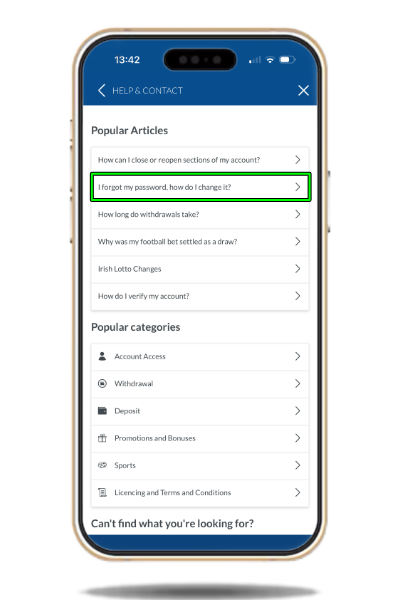
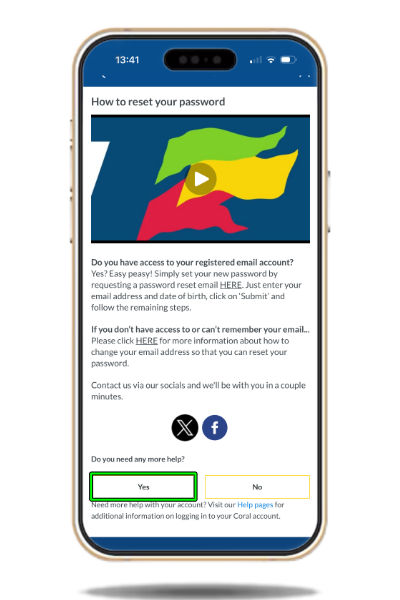
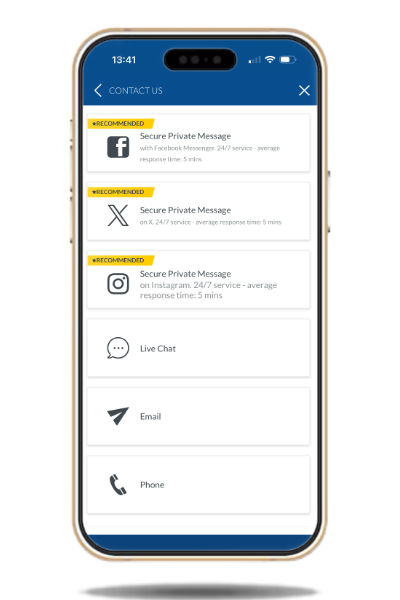
Help & Contact sits at the bottom of account settings. Articles cover most common queries. To reach an agent: open a help article (for example the forgot-password article), use the “need further help?” Yes path at the bottom, then pick a contact method from the list Coral shows.
FAQ
How do I change the odds format on the Coral app?
Account settings (user icon) → Settings → Betting Settings. Change the odds format there (fractional, decimal or American, depending on what’s offered in your region).
I forgot my username or password — what now?
On the login screen tap forgot username/password, enter the email on the account, and Coral will send a reset link or username reminder. If you can’t access that email, contact Coral support via Help & Contact.
How do I use a free bet?
If a free bet can be used on your selection, a free-bet option appears in the bet slip. Tap it, choose the free bet, optionally top up with a cash stake, then place. Free-bet stakes are not returned on winners — only the winnings are paid (for example a £10 free bet at 2/1 returns £20 profit, not £30).
Where is the current welcome offer?
In the header at the top of this page — claim terms and eligibility change, so treat the header as the source of truth rather than any older wording in guides.
Does Build Your Bet support cash out?
Yes on Build Your Bet tickets placed through the Match Markets tab when Coral offers cash-out on that ticket — check the cash-out icon / My Bets hub after placing.
Do I need a separate casino balance?
No. Sports and casino share a single wallet inside the sports app.
Responsible gambling
Coral provides in-app gambling controls so you can set limits and take breaks. Full policy: myaccount.coral.co.uk safer gambling. How to open the tools is covered in the user guide.
Tools available
- 24-hour irreversible time-out
- Deposit limits
- Max stake limits
- Time curfews for deposits
- Reality check
- Specific product bans
- Account closure
- Take a 6-week break
Further help
Independent support: BeGambleAware.org, GamCare, GAMSTOP and BetBlocker. For questions about this site, use the In Play contact page.
If gambling is causing harm, use the in-app tools and independent help via BeGambleAware.org or the National Gambling Helpline.
18+ | Please gamble responsibly | BeGambleAware.org | Terms apply to all offers and features mentioned above.